








< Blogs

Best Days and Times to Post on Instagram for Business

Vivan Z.
Created on December 13, 2024 – Last updated on February 6, 202512 min read
Written by: Vivan Z.

best days and times

Hey there! Have you ever noticed that sometimes you post great content on Instagram, but it doesn’t get the engagement you were hoping for? Could it be that the timing was just off? That’s right! Timing is an important factor when it comes to Instagram success—it’s not just a coincidence. The right time to post can seriously boost your visibility and engagement, helping your post stand out in the crowded feed. So today, let’s talk about how to choose the best time to share your content and make sure you get those likes and comments!

Understanding Instagram’s Algorithm

Before we dive into the best times to post, it’s important to understand how Instagram’s algorithm works. Instagram doesn’t just show posts to everyone who follows you. Instead, it uses a combination of factors like content relevance, engagement, and post timing to decide who sees your post. The more likes, comments, and shares you get early on, the more likely Instagram is to push your post out to a larger audience.

Timing matters because if you post when your followers are active, there’s a higher chance your content will get immediate engagement, which helps Instagram rank it higher in their feed. The more interaction your post gets, the better its visibility.

Best Days and Times to Post on Instagram

The best time and worst time to post on Instagram depends on your audience, but research from social media platforms like Sprout Social and Hootsuite offers these general insights:
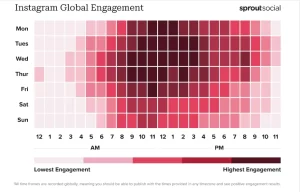
Instagram Global Engagement
Sourced: Sprout Social

Best Times:
Monday to Friday, 9 AM to 11 AM – Many people check Instagram during their morning breaks.
Late Afternoon, 5 PM to 7 PM – Engagement spikes as users unwind after work or school.

Best Days:
Wednesday and Thursday – These days typically see the highest engagement across most industries.
Friday, 1 PM to 3 PM – As people prepare for the weekend, they are more likely to browse social media.

Worst Times:
12 AM – 6 AM – Most users are asleep, so posts during these hours get minimal engagement.
Early Morning on Weekends – Saturdays and Sundays before 9 AM see lower activity as people tend to sleep in or are less active online.

Adapting to Your Specific Audience

While these general guidelines provide a solid foundation, the most effective strategy involves continuously analyzing your own audience’s behavior. Here’s how you can fine-tune your posting schedule:

1.Use Instagram Insights
For business accounts, Instagram Insights offers valuable data on when your followers are most active. Navigate to the Audience section to see peak activity times by day and hour.

2.Third-Party Analytics Tools
Tools like Hootsuite, Later, and Buffer provide more detailed analytics and can help you schedule posts based on your audience’s behavior patterns.

3.A/B Testing

Experiment by posting at different times and days to see which slots generate the highest engagement. Track metrics like likes, comments, shares, and saves to determine the most effective times.

4.Monitor Competitors
Observe when your competitors are posting and how their audience responds. This can provide additional insights and help you identify potential gaps in your own strategy.

5.Adjust for Seasonal Trends
Be mindful of seasonal changes and holidays that might shift your audience’s activity patterns. For example, during holiday seasons, engagement times might shift to accommodate festive schedules.

How to Customize Posting Times for Your Audience

While general data on the best times to post on Instagram can give you a helpful starting point, it’s important to customize your posting schedule based on your specific audience. The key to maximizing engagement is to understand when your followers are most active and tailor your strategy accordingly. Here’s how you can do that:

Use Instagram Insights to Analyze Audience Activity

Instagram offers a native analytics tool called Instagram Insights, which provides valuable data about your audience’s behavior, including when they are most active. Here’s how you can use it:

Access Instagram Insights:
Go to your Instagram profile and tap the hamburger menu (three horizontal lines) in the top right corner.Select Insights under the Account section.
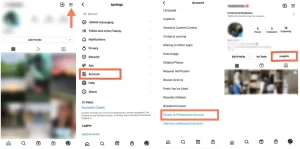
Insights 2

Understand Your Audience Insights

Under the “Insights” section, go to the “Audience” tab to explore key details about your followers. Here, you’ll find data on their age range, gender, and location (both country and city). These insights help you tailor your content and posting strategy to better connect with your audience.
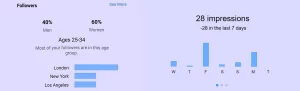
Followers & Impressions

By analyzing these insights, you can identify specific time slots when your followers are most likely to be online and engaging with content.

Use Third-Party Tools for Deeper Analysis

If you want a more detailed understanding of your audience’s behavior, there are several third-party social media analytics tools that can provide advanced insights into Instagram performance. Some of these include:

Hootsuite  

Hootsuite is a versatile social media management tool that helps streamline your social media strategy.Best for Businesses managing multiple social accounts or teams that need a collaborative tool.

Functions:
• Scheduling: Plan and publish posts across multiple platforms, including Instagram, Facebook, Twitter, and LinkedIn.
• Analytics: Track engagement metrics and measure campaign performance.
• Social Listening: Monitor mentions and keywords to stay updated on trends.
• Team Collaboration: Ideal for teams managing multiple accounts.
Hootsuite

Sprout Social

Sprout Social combines social media management with advanced analytics, making it a great tool for optimizing social strategies.Best for brands focused on data-driven decision-making and social listening.

Functions:
• Advanced Analytics: Gain insights into audience behavior and performance metrics.
• Publishing and Scheduling: Schedule posts with a content calendar and optimize timing.
• Social Listening: Track brand mentions and competitor activity.
• CRM Integration: Build detailed audience profiles for personalized engagement.

Sprout Social

Later

Later is a user-friendly tool focused on visual social media platforms, making it particularly popular for Instagram management.Best For influencers and small businesses looking for a simple, visually-driven scheduling tool.

Functions:
• Visual Planning: Drag-and-drop calendar to plan and preview your posts.
• Hashtag Suggestions: Boost visibility with smart hashtag recommendations.
• Best Time Suggestions: Find optimal posting times based on engagement history.
• Media Library: Organize photos and videos for easy access.
Later

These tools can help you track performance over time and pinpoint patterns that Instagram Insights might not fully reveal.

Test Different Times and Track Results

A critical part of optimizing your posting schedule is testing. Even if your audience’s data suggests certain peak times, it’s important to run experiments to see what works best for your specific content. Here’s how you can do that:

• Post at Different Times: Try posting your content at different times of the day or week to gauge engagement.
• Track Engagement Metrics: Pay attention to key engagement metrics like likes, comments, shares, and saves. Instagram Insights and third-party tools can help you track these metrics over time.
• Analyze Results: After posting at different times, compare the results to see which posts performed best. This will allow you to see if your audience responds better in the mornings, afternoons, or evenings.

Optimize Your Strategy Based on Results

Once you’ve tested different times and tracked your performance, it’s time to refine your strategy. Based on the insights you gather, adjust your posting schedule to focus on the times that drive the most engagement.

Regularly Reassess Your Strategy: Audience behavior can change over time. New trends, holidays, or shifts in daily routines can impact when your followers are most active. So, make it a habit to check your Instagram Insights regularly and adjust your posting times as needed.

By continuously monitoring and optimizing your posting times based on your audience’s activity, you’ll be able to keep your Instagram account performing at its best!

Quick Tip:

If your audience is spread across different time zones, consider posting multiple times throughout the day or using Instagram’s scheduling tools to ensure your content reaches followers at the most effective times, no matter where they are.

Practical Tips for Consistent Posting 


To maintain a strong presence on Instagram and keep your audience engaged, consistency is key. One of the best ways to ensure you’re posting regularly—and at the right times—is to use content planning tools. These tools help you schedule your posts, monitor engagement, and fine-tune your strategy. Here are some practical tips for staying consistent and making the most of Instagram’s features.


1. Posting During “Non-Optimal” Times: Use Stories and Reels

What if you want to post at times that aren’t necessarily the peak engagement hours? Don’t worry, Instagram has some fantastic features, like Stories and Reels, that can help you reach your audience—even outside the “golden hours.”


• Instagram Stories:

Stories are great for real-time, casual engagement, and they don’t have to compete with the main feed’s algorithm. Even if you post your Story at non-optimal times (like late nights or early mornings), Stories are shown at the top of your followers’ feed and have a higher chance of being viewed. Plus, people are likely to engage with Stories in the moments when they’re casually checking Instagram—even outside regular posting times.


• Instagram Reels:

Instagram’s algorithm prioritizes Reels, which means they can still get a significant reach, even if you post them at unconventional times. Because Reels have a separate feed and are heavily promoted by Instagram, they’re likely to be seen by a larger audience—even those who aren’t currently active on your profile. This makes Reels a great tool for content you want to get exposure at any time.


instagram stories 2


By combining regular posts with Stories and Reels, you can still keep your content visible to your audience, even if you’re posting outside the optimal timeframes.


2. Set Reminders for Posting and Track Engagement 


To stay consistent and ensure you’re hitting your target posting times, set reminders using apps like Google Calendar or Reminders on your phone. Scheduling these alerts will help you stay on track and avoid missing out on posting when your audience is most active.


google Calendar


Boost Your Instagram Sales with DropSure


Timing your Instagram posts well is key to not just engagement but also driving sales. When you post at the right time, your content has a higher chance of turning interactions into purchases.


How DropSure Helps You Sell on Instagram


DropSure is a dropshipping platform that makes it easy to sell directly on Instagram without handling inventory. It helps you:

• Find Trending Products: Quickly spot hot products to feature.

• Simplify Fulfillment: DropSure takes care of shipping and inventory.

• Boost Sales: Integrate with Instagram to showcase products and drive conversions.


Start Today 


Sign up for DropSure and start optimizing your Instagram posts for better sales.

Buttom


DropSure is Your Best Partner
22 Years Experience
Affiliate Rebates
100% Quality Guarantee
Top-Up Rewards
10+ Global Warehouses
Custom Branding Support
Smart inventory System
24/7 Customer Support
Get a Quote in 24 Hours
Start Sourcing for Free

Keep Learning

Have you ever found yourself asking, “What is a supplier? What is a manufacturer?” These two terms are thrown around a lot in e-commerce, but they’re not the same. If you’re running a dropshipping business or any online store, it’s important to understand how these roles work and how they impact your business. Let’s break it down step by step. What Is a Supplier? A supplier acts as the middleman between manufacturers and businesses. They don’t make the products—they buy them from manufacturers and sell them to businesses like yours. Suppliers are essential because they provide ready-made products, saving you the hassle of dealing with raw materials or production. Why Are Suppliers Important? Suppliers make your life easier. They usually carry a wide range of products, so you don’t have to work with multiple manufacturers. For example, if you’re selling yoga equipment, a supplier could provide yoga mats, straps, and blocks all in one place. This makes the process faster and more efficient. Suppliers are especially useful for businesses that need small quantities or a variety of products. They also simplify inventory management since you can restock quickly without long production times. What Is a Manufacturer? Manufacturers are the creators of products. They take raw materials and turn them into finished goods. Think of them as the foundation of the supply chain. Without manufacturers, there would be no products for suppliers to distribute. Why Work with a Manufacturer? Manufacturers are ideal if you want custom products or plan to order in bulk. For instance, if you want yoga mats with your logo or a specific design, a manufacturer can make it happen. They allow you to control the quality, materials, […]

Have you ever wondered how to turn TikTok into a money-making platform for your dropshipping business? With its massive audience and viral content, TikTok is an ideal platform to showcase your products. But how do you get started? In this guide, we’ll show you the steps to launch your dropshipping store on TikTok, from choosing winning products to creating ads that catch viewers’ attention. Ready to tap into the TikTok goldmine? Let’s dive in! What is TikTok Dropshipping? TikTok is a short-video platform with over 1 billion users worldwide. With its strong engagement and large user base, it has become an ideal platform for dropshipping businesses. Dropshipping is an e-commerce model where businesses don’t need to keep products in stock. Instead, they partner with suppliers who ship the products directly to customers when an order is placed. This means you don’t have to worry about inventory or shipping, just focus on marketing and sales. TikTok gives you the chance to interact directly with customers by showing your products and brand through short videos, which helps increase conversions. How to Dropship on TikTok? When starting a dropshipping business on TikTok, here are some key steps that can help you enter the market and increase sales: 1.Research Products First, understand which products are popular on TikTok. By observing trending content on TikTok, you can see which products are hot among young people, especially on a creative platform like TikTok. Some of the most popular categories include: ● Cosmetics and Skincare Products ● Fashion Accessories ● Home Decor and Small Items ● Toys and Creative Products: You need to find a less competitive niche. While big brands may have already captured the market […]

In the world of e-commerce, dropshipping has become the gateway for countless entrepreneurs looking to start an online business with low risk and minimal investment. No inventory. No warehouse. No upfront bulk buying. Sounds amazing, right? But here’s the catch — your entire dropshipping business depends on one thing: your supplier. Pick a good one, and your customers get their orders fast, quality stays consistent, and your store thrives.Pick the wrong one… and you’ll drown in refunds, complaints, and one-star reviews. In this comprehensive guide, we’ll break down how to find, evaluate, and choose a reliable dropshipping supplier, and most importantly — how to avoid scams and rookie mistakes that could destroy your business before it even begins. 1. Understanding the Role of a Dropshipping Supplier Before diving into selection criteria, let’s make sure we’re clear on what a dropshipping supplier actually does. A dropshipping supplier is the bridge between your store and your customers. You handle marketing, customer service, and sales. They handle product storage, packaging, and shipping. When a customer places an order on your website: You forward the order details and payment to your supplier. The supplier picks, packs, and ships the product directly to the customer. You keep the profit margin between your retail price and the supplier’s cost. Sounds simple — but it’s also a fragile system. If your supplier is unreliable, you lose control of your brand’s reputation, even if the problem wasn’t your fault. That’s why choosing a trustworthy supplier is the single most important decision in your dropshipping journey. 2. The Hidden Risks of Bad or Fake Suppliers Before learning how to find good suppliers, you must understand the red flags of […]