Managing a dropship store can often feel overwhelming, especially when you’re handling everything on your own. With no assistant by your side, you must tackle everything from product uploads to marketing promotions on your own. Fortunately, your suppliers take care of all the packaging and shipping, so you don’t have to worry about logistics. However, you still need to deal with customer inquiries, product displays, and the ever-changing market demands. If you find that despite your continuous efforts, your sales remain stagnant, it might be time to invest in some efficient dropship tools.
These tools can help you save valuable time, enabling you to run your store more efficiently with the aid of technology. Whether you’re a newcomer just starting out or an experienced merchant, choosing the right tools will give you a significant boost. Next, we will introduce 8 essential dropship tools designed to optimize your workflow and ensure the continuous growth of your e-commerce store.
DropSure Automated Software
Under traditional methods, you need to manually obtain product images, set prices, wait for customers to place orders, and then contact your suppliers via SMS, phone, or chat to ship the products. Although this manual process can be effective, it often suffers from delays due to multiple points of communication, which negatively impacts customer experience. DropSure Automated Software resolves these issues. It integrates seamlessly with major e-commerce platforms—such as Shopify, Lazada, Shopee, Etsy, eBay, Amazon, and others—automating tasks like product uploads, order management, shipment tracking, and invoice generation. As a result, whether it’s product display or order processing, everything is completed at the highest speed, enhancing both customer satisfaction and your store’s profitability.
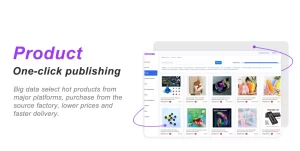
With DropSure, you can effortlessly achieve fully automated operations from product listing to order shipment. The system automatically synchronizes the latest product information and inventory data from your supplier’s database, ensuring that your store always presents the most accurate details. Additionally, DropSure supports real-time order notifications—whenever a new order is placed, the system alerts you immediately, enabling you to respond quickly and avoid losing customers due to delays.
What’s more, DropSure’s intelligent data analysis feature monitors various operational metrics and generates detailed reports. These reports provide deep insights into which products are most popular and which areas might be experiencing bottlenecks, allowing you to adjust your sales strategies based on data. This not only boosts your operational efficiency but also drives significant profit growth for your store.
Canva Image Editing Tool

In online sales, first impressions are critical. Although you can use product images provided by your supplier directly, a little editing can make them stand out even more.
Canva is a user-friendly image editing tool that allows you to easily create eye-catching product images using its vast library of templates, regardless of your design experience. Moreover, Canva offers a wealth of design elements and an intuitive editing interface, enabling you to produce professional-grade visual content in a short amount of time.
With Canva, you can quickly enhance your images by adjusting colors, adding filters, or refining compositions to make your product photos more appealing. Additionally, the Canva Pro version provides advanced features such as background removal, layer management, and batch resizing, making the design process even more efficient and convenient. With these tools at your disposal, you can customize images to meet the specific requirements of different social media platforms (such as Facebook, Instagram, Twitter, etc.), ensuring optimal visual performance across all channels.
Furthermore, Canva supports team collaboration, allowing you to work with your team members on design projects, share ideas, and provide real-time feedback to ensure a consistent style across all marketing materials. By regularly updating and creatively utilizing various templates, your e-commerce store can not only enhance its brand image but also quickly stand out in the highly competitive market.
Oberlo Multi-Platform Product Upload Tool
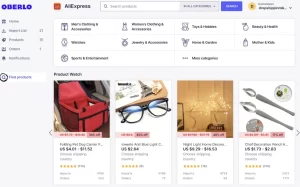
Manually uploading product information across multiple platforms is not only tedious but also prone to errors. Constantly repeating data entry wastes valuable time and may lead to inconsistencies that confuse your customers. Oberlo provides you with an efficient one-click import solution that automatically imports product details into major e-commerce platforms such as Shopify and WooCommerce. Simply select the products you like within Oberlo, and the system will automatically retrieve product images, descriptions, and prices from your suppliers, seamlessly synchronizing all data across platforms. This allows you to focus on marketing and customer service instead of wasting energy on repetitive tasks.
More importantly, Oberlo updates product information in real time. Whenever a supplier’s inventory or pricing changes, your store’s data is automatically adjusted to ensure you always display the most up-to-date and accurate product details. This not only boosts your operational efficiency but also reduces order issues caused by outdated information, ultimately providing a better shopping experience for your customers.
Additionally, Oberlo’s intuitive user interface and smart management features make it easy for beginners to quickly get started and effortlessly manage a large volume of products. With the help of this automated tool, you can dedicate more time to brand building and marketing, allowing your e-commerce store to steadily thrive in a highly competitive market.
HubSpot CRM Customer Relationship Management System

Customers are the foundation of your store’s development. Traditional methods of managing customer information not only become overwhelming but often result in scattered data across various platforms and spreadsheets, making it difficult to gain systematic insights.
HubSpot CRM provides you with a centralized management platform that automatically records each customer’s purchase history, communication records, and feedback, completely solving the issue of fragmented information. With its powerful data analysis capabilities, you can easily understand customer needs and behavioral patterns, enabling you to develop more precise marketing strategies and boost conversion rates.
Even more importantly, HubSpot CRM comes equipped with built-in automation tools for communication, which help you regularly send promotional emails, discount notifications, and customer care messages. Whether it’s guiding new customers or maintaining existing ones, the system automatically triggers the appropriate communication flows based on customer interactions, helping your store build long-term loyal customers.
Moreover, HubSpot CRM features an intuitive and user-friendly interface, allowing both novices and experienced merchants to quickly get started, achieving comprehensive integration and efficient management of customer data. With detailed reports and real-time monitoring generated by the system, you can always stay informed about customer conversion rates and the effectiveness of your marketing campaigns, thereby continuously optimizing your operational strategies.
Mailchimp Marketing Automation Tool

In the fierce market competition, having a precise and efficient marketing strategy is essential. Manually creating and sending marketing emails is not only time-consuming and labor-intensive but also often fails to ensure consistency and personalization. Mailchimp provides you with a comprehensive email marketing solution that helps you automatically create and schedule a variety of marketing emails. Whether it’s for product promotions, discount events, or holiday greetings, Mailchimp enables you to easily achieve personalized marketing, ensuring that each email accurately conveys your brand message and promotional offers.
With its intuitive drag-and-drop design tool, you don’t need professional design skills to quickly generate visually outstanding email templates. The built-in data tracking feature monitors open rates, click-through rates, and conversion rates in real time, providing you with detailed reports on your marketing performance. Using these insights, you can continually optimize your email content and sending strategies, ensuring that every marketing campaign precisely reaches your target audience.
Furthermore, Mailchimp’s automation features allow you to set up marketing workflows in advance. Once specific conditions are triggered—such as user registration, abandoned shopping carts, or designated time points—the system automatically sends out customized emails, significantly boosting customer conversion rates and brand loyalty.
In short, investing in the Mailchimp Marketing Automation Tool not only greatly enhances your marketing efficiency but also drives continuous traffic and sales growth for your e-commerce store, keeping your business ahead in the highly competitive market.
Google Analytics Data Analysis Tool

To understand your store’s operational status and customer behavior, data analysis is indispensable. Traditional operating models might have you making decisions based solely on intuition, but real situations require detailed data support. Google Analytics provides comprehensive website traffic data, user behavior, and conversion rates, giving you complete insight into every aspect of your store. With this tool, you can monitor important metrics in real time, such as traffic sources, page dwell time, bounce rates, and purchase paths, enabling you to fully understand the customer journey within your store.
By generating custom reports, Google Analytics helps you quickly identify sales bottlenecks and traffic trends. Whether it’s a high bounce rate on a specific product page or low conversions from a particular advertising channel, these issues become immediately apparent. You can then formulate targeted improvement strategies based on these data, optimizing page design, adjusting marketing channels, or enhancing user experience to ensure that every investment brings maximum returns.
Additionally, Google Analytics integrates seamlessly with other marketing tools, making data sharing and analysis even more convenient. Real-time data monitoring not only helps you keep track of operational dynamics but also provides a solid foundation for future strategic decisions, keeping your e-commerce store at the forefront of the market.
Stock Sync Inventory Monitoring Tool

Although dropshipping doesn’t require you to hold inventory, the stock levels of your suppliers directly impact order fulfillment efficiency. Manually monitoring inventory not only increases the risk of oversights but also may lead to order delays or cancellations due to outdated information, ultimately affecting customer experience. Stock Sync automatically updates supplier inventory data and synchronizes it with your store in real time. The system continuously monitors the stock status of each product, and if any anomalies are detected, it promptly issues alerts, enabling you to take swift action. This ensures that your product information remains accurate and order processing runs smoothly, providing customers with a more stable and efficient shopping experience.
Furthermore, Stock Sync supports multi-platform inventory management and seamlessly integrates with major e-commerce systems, ensuring that all data remains consistent. Whether you’re responding to sudden inventory fluctuations or planning long-term product strategies, Stock Sync offers real-time, accurate data support, giving you a competitive edge in the fierce market.
By automating inventory monitoring, you can significantly reduce risks associated with stockouts or delayed information, ensuring that every customer enjoys timely and reliable order fulfillment. Investing in Stock Sync is a crucial step toward enhancing your store’s operational efficiency and strengthening customer trust.
Buffer Social Media Management Tool

Buffer is a social media management tool that enables you to efficiently manage multiple social media accounts and schedule content in advance. By integrating platforms such as Facebook, Instagram, Twitter, LinkedIn, and Pinterest, Buffer allows you to plan and coordinate content across various channels, ensuring consistent and timely brand messaging.
With its intuitive drag-and-drop interface, Buffer simplifies the process of creating and scheduling posts, allowing you to set up content calendars for multiple platforms simultaneously. This ensures that updates on platforms like Facebook, Instagram, and Twitter are organized and timely. Buffer also offers a browser extension for easy content sharing across the web.
Buffer provides detailed analytics, tracking engagement metrics such as interactions, click-through rates, and audience responses for each post. This data helps you understand which content resonates most with your audience and identify the optimal times for posting. By leveraging these insights, you can continually refine your social media strategy to enhance brand influence and attract more potential customers to your store.
In summary, investing in Buffer as a social media management tool can significantly improve your content scheduling efficiency, maintain an active and consistent brand presence across major social platforms, and create more opportunities for traffic and sales growth in your e-commerce business.












 12 min read